
Dear Cornerspring families
Cornerspring Montessori will be using a new school management software, Cordelia by Clever Education Solutions (CES), to make it easier to share information with you online. This portal is where you can register your student and receive important notices from our school about your student and our community.
Please note that this is a web-based portal, not an app, so you’ll access it through your preferred web browser.
To sign up for an account through Cordelia that will give you access to the Cornerspring portal, please watch this short video on YouTube or follow the written version of the directions below:
- Go to the following site: https://my.cordeliaeducation.com/login
- Click on “Forgot Password? Create New Password”
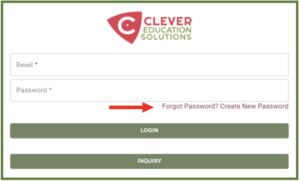
- Enter the email address (email address form Parent/Guardian Information section) at which you received this notification and create your own secure password
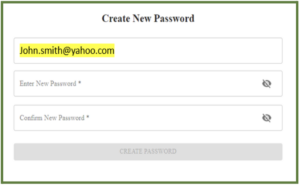
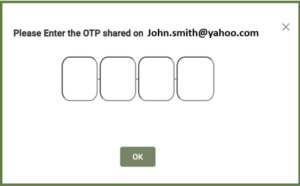
- Once you complete the password creation process, you will receive an email with a One-Time-Passcode (OTP) from No Reply Clever Education Solutions. (You may need to check your spam folder if you don’t receive an email in your inbox.)
- Enter the OTP in the Cordelia prompt
- Log into Cordelia using the password you created.
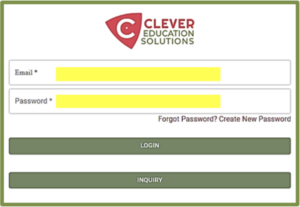
And you’re in! Now you can edit your student profile. If you need help editing your student profile, go here to watch a short YouTube video with instructions.
Should you run into any issues using Cordelia, please contact Serge, our Customer Success representative, by calling 919-604-2261 or via email at serge@clevereducationsolutions.com
What Our Families Have to Say about Cornerspring
“Children at Cornerspring don’t just learn academics—they learn life skills and how to foster their own independence. Cornerspring makes each child feel special and capable.” –Cornerspring Parent